Trucking accounting software with zero spreadsheets
Payroll, fuel, tolls, maintenance, IFTA, and broker billing in one system that shares the same data as dispatch — so every number is entered once, reconciles itself, and lands in QuickBooks without re-keying.
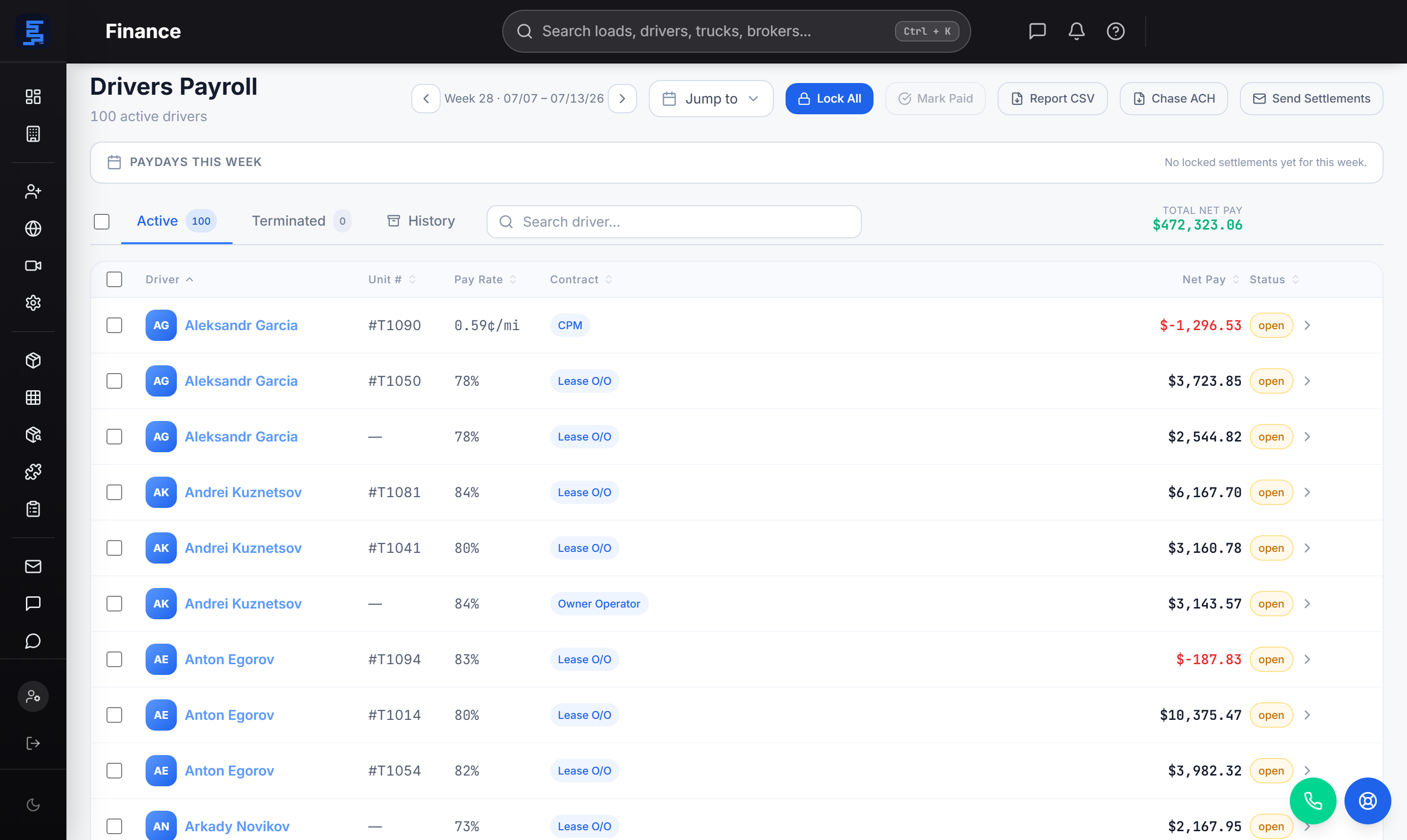
Driver settlements that draft themselves
Generic accounting software has no idea what a load is. Strivie reads the loads you delivered, calculates each driver's pay off their setup, applies the fuel, tolls, and deductions, and hands you a settlement ready to pay. You reconcile finished numbers instead of building them — then export a Chase ACH file and sync to QuickBooks in one step.
- Settlements drafted from delivered loads — no re-keying from dispatch
- Pay by percentage of load, by the mile, or as an owner-operator — set per driver
- Fuel, tolls, advances, PO charges, and escrow itemized automatically
- Chase ACH (Nacha-style) CSV for driver and employee direct deposit
- Locked settlements post to QuickBooks Online and Desktop — no double entry
Fuel and tolls, matched to the truck automatically
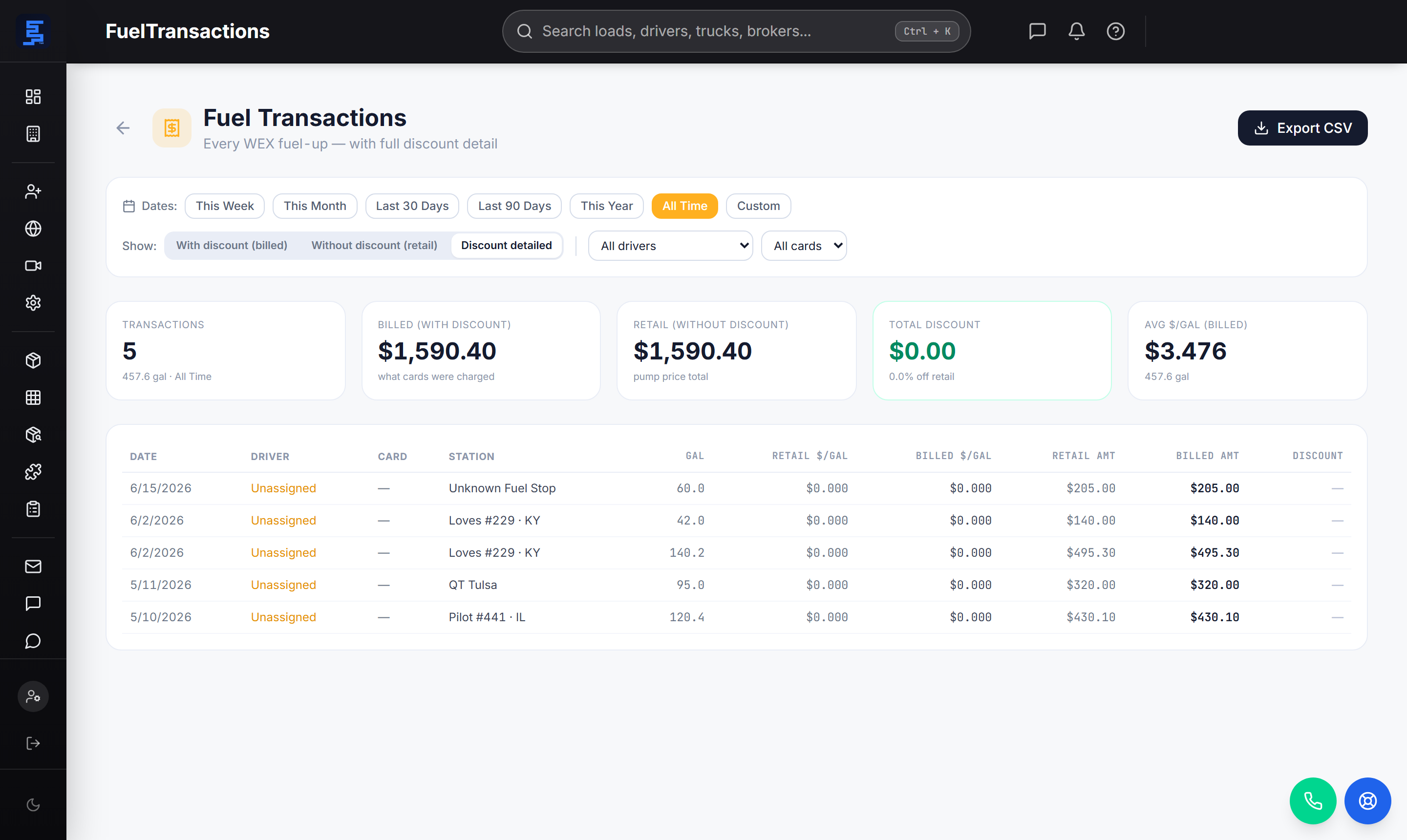
Fuel and tolls are the easiest costs to lose track of. Strivie pulls every fuel-card transaction and matches it to the truck that fueled — cross-checked by GPS location — and captures tolls across the fleet and matches them to the run — so the gallons and the toll charges land on the right driver and settlement, with true tank-to-tank MPG per fill. Nothing slips through at settlement time.
- Fuel-card gallons matched to the truck, GPS-verified, priced, and charged
- True tank-to-tank MPG calculated per fill
- Tolls captured across the fleet and matched to the run
- Fuel charge period configurable — per-load or flat calendar week
- Review flags when a charge can't be matched to a truck
Repairs as purchase orders, IFTA that builds itself
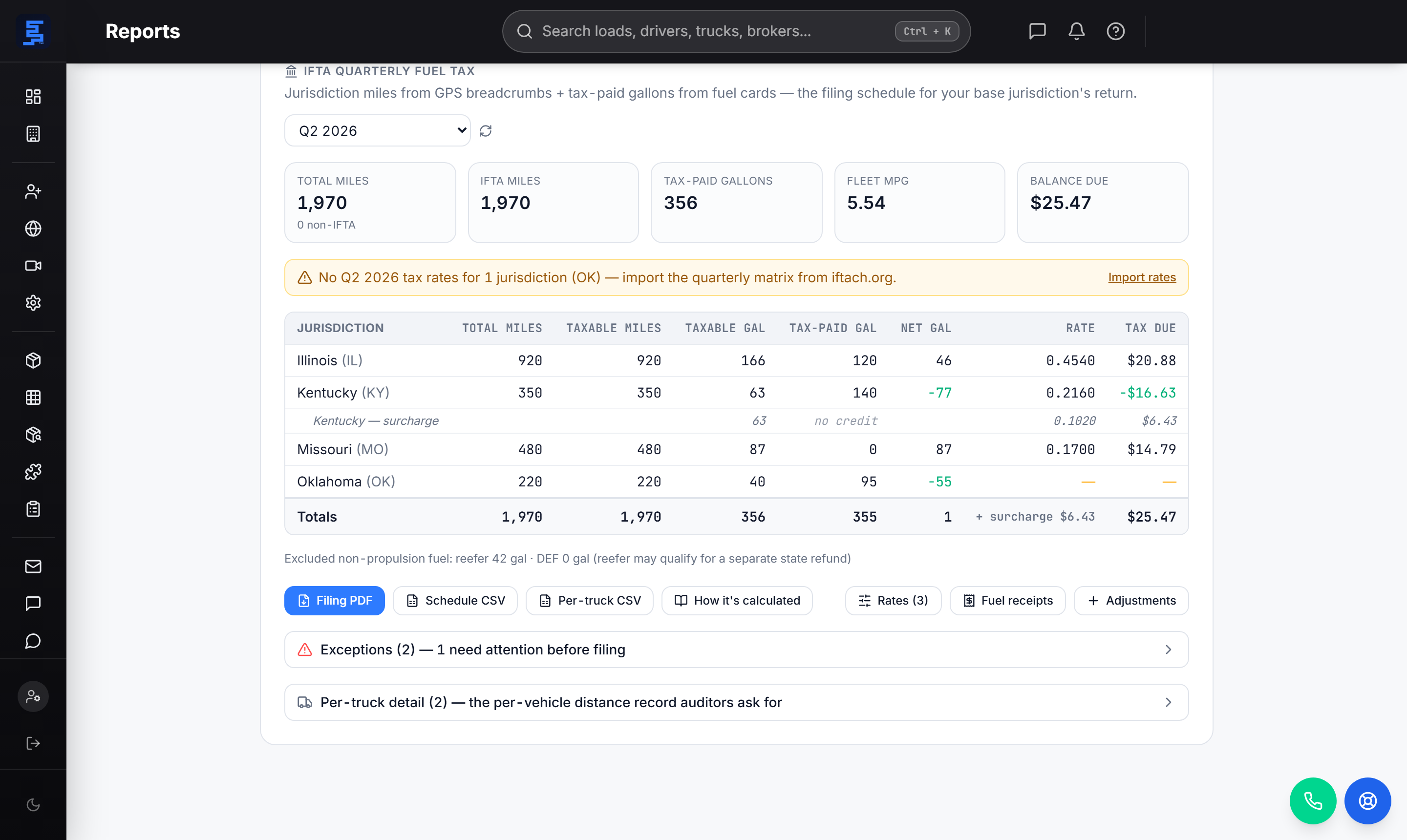
Maintenance, repairs, and roadside fixes are logged as purchase orders against the truck or the driver — company-pay or driver-charge — so shop costs live in the system, not a spreadsheet. And because the miles your trucks drove and the fuel they bought are already here, your IFTA quarterly return builds itself: jurisdiction miles from GPS, tax-paid gallons from the fuel cards, and the filing schedule ready to submit.
- Maintenance, towing, and roadside repairs logged as POs against the unit
- Company-pay or driver-charge, with the charge itemized on the settlement
- IFTA return computed from GPS jurisdiction miles + tax-paid gallons
- Per-jurisdiction schedule, surcharges, and net balance due — ready to file
- No spreadsheet, no re-keying between systems
Invoice the broker — and fix the paperwork in the app
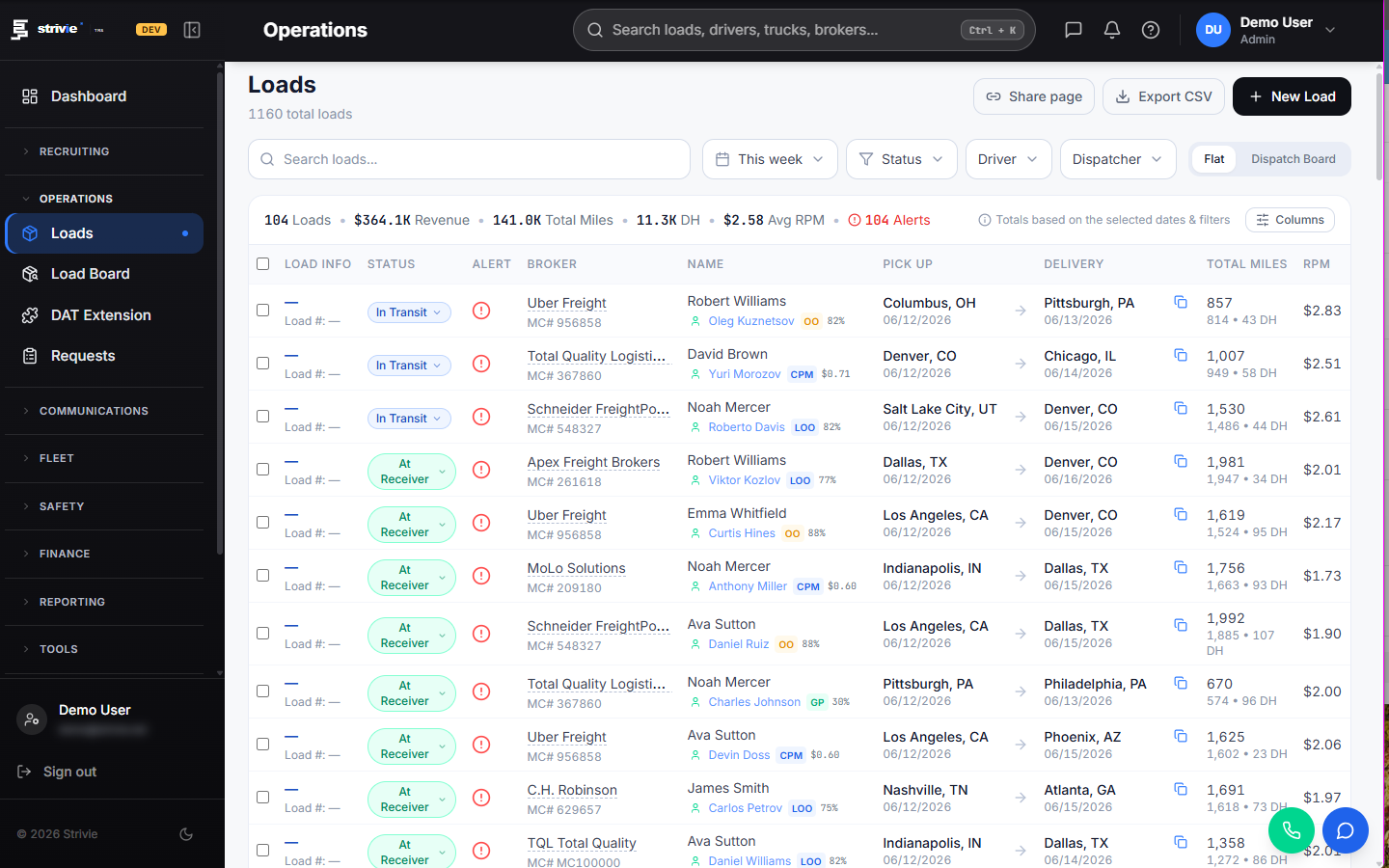
When a load delivers, invoice the broker in one click: the rate confirmation and POD travel with the load, and Open AR, short-pays, and days-to-pay are tracked for you. Messy scan? Clean up the bill of lading right inside the billing workspace — crop and re-scan it — then bill and send, without leaving the system or opening a separate PDF tool.
- Invoice the broker in one click when a load delivers
- Rate confirmation and POD attached to the load, ready to send
- Clean up a messy bill of lading in the billing workspace — no separate tool
- Open AR, short-pays, recourse, and days-to-pay tracked automatically
- Factoring-ready exports and QuickBooks invoices without re-typing
Questions carriers ask
What is trucking accounting software, and how is it different from QuickBooks?
Trucking accounting software understands loads, drivers, fuel, tolls, and IFTA — the things a general ledger tool like QuickBooks doesn't. QuickBooks is where your books live; Strivie is where the operational accounting happens: it drafts driver settlements from delivered loads, matches fuel and tolls to the truck, builds the IFTA return, and invoices brokers, then syncs the results to QuickBooks Online or Desktop so your books match without re-keying.
Does it handle driver payroll and settlements?
Yes — that's the core. Delivered loads draft into settlements automatically, with pay by percentage, by the mile, or as an owner-operator set per driver. Fuel matched to the truck, tolls, load advances, PO charges, and weekly fixed costs (truck/trailer rent, insurance, ELD, IFTA, escrow) are itemized automatically, and you pay out over a Chase ACH direct-deposit file.
How does fuel and toll tracking feed accounting?
Every fuel-card transaction is matched to the truck that fueled — cross-checked by GPS so unmatched fills get flagged — priced, and charged to the right driver's settlement, with tank-to-tank MPG per fill. Tolls are captured across the fleet and matched to the run the same way. Because that data is already in the system, it also feeds the IFTA return — no separate import.
Can it do IFTA fuel tax reporting?
Yes. Strivie builds the IFTA quarterly return from the jurisdiction miles your trucks actually drove (from GPS) plus the tax-paid gallons from your fuel cards — a per-jurisdiction schedule with taxable miles, net gallons, surcharges, and the balance due, ready to file. No spreadsheet and no re-keying.
How do I invoice brokers and fix the paperwork?
When a load delivers you invoice the broker in one click, with the rate confirmation and POD already attached. If the paperwork is messy, you clean up the bill of lading right inside the billing workspace — crop and re-scan it — then bill and send. Open AR, short-pays, and days-to-pay are tracked automatically, and invoices sync to QuickBooks.
Does it integrate with my ELD/GPS, fuel card, and QuickBooks so I don't re-key data?
That's the point. Strivie is BYOC — you connect your own ELD/GPS, fuel card, factoring, and QuickBooks accounts, and it becomes the hub that ties them together. Dispatch, tracking, and accounting share the same data, and settlements and invoices sync to QuickBooks Online and Desktop, so numbers are entered once.
Is it a fit for a small carrier, or only large fleets?
It's built for owner-operators and growing fleets as much as large ones. The accounting runs itself off the loads you're already dispatching, so a small back office stays lean — one person can run payroll, fuel, tolls, IFTA, and billing from the same system instead of stitching together spreadsheets and separate logins.
Close the books without the spreadsheets
Strivie drafts the settlements, matches the fuel and tolls, logs the repairs, builds the IFTA return, and invoices the brokers — one system, one set of numbers, synced to QuickBooks. See it run on your own loads.