Trucking payroll software that drafts the settlements for you
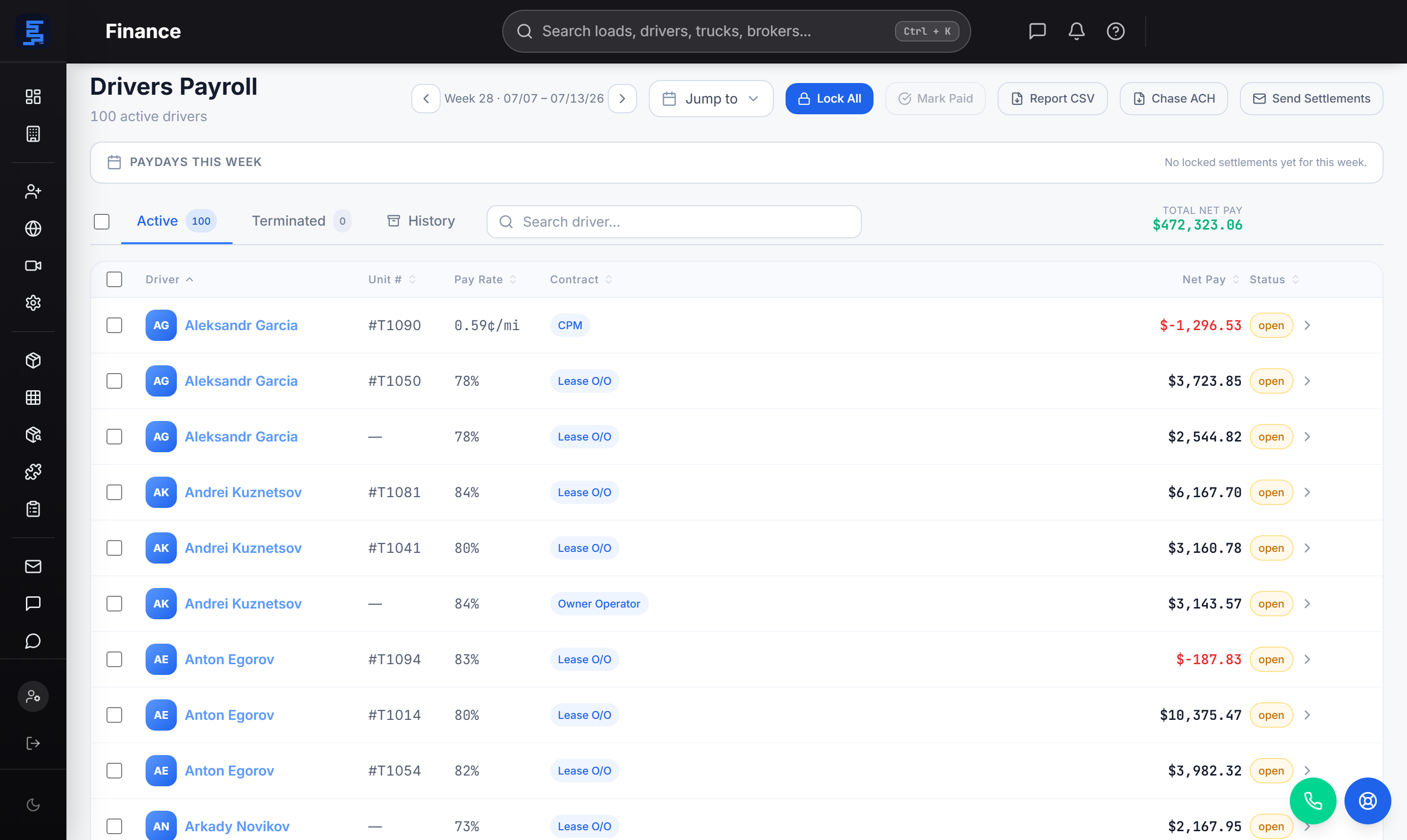
Strivie reads the loads you delivered, posts the fuel, applies the deductions, and hands you a driver settlement ready to pay. Your morning starts with numbers to check, not numbers to build.
Settlements that write themselves
Generic payroll tools don't know what a load is. Strivie does — it pulls the loads that were delivered, calculates each driver's pay off their share of the rate, and drafts the settlement before you're back at your desk. You open a finished driver settlement statement and reconcile, instead of keying miles and rates by hand.
- Drafts driver settlements from delivered loads — no re-keying from dispatch
- Pay by percentage of load, by the mile, or as an owner-operator — set per driver
- Fuel, advances, PO charges, and escrow itemized on the statement automatically
- Deductions lock so a settled week stays settled
- Dispatcher commissions calculated as a configurable percentage of load margin
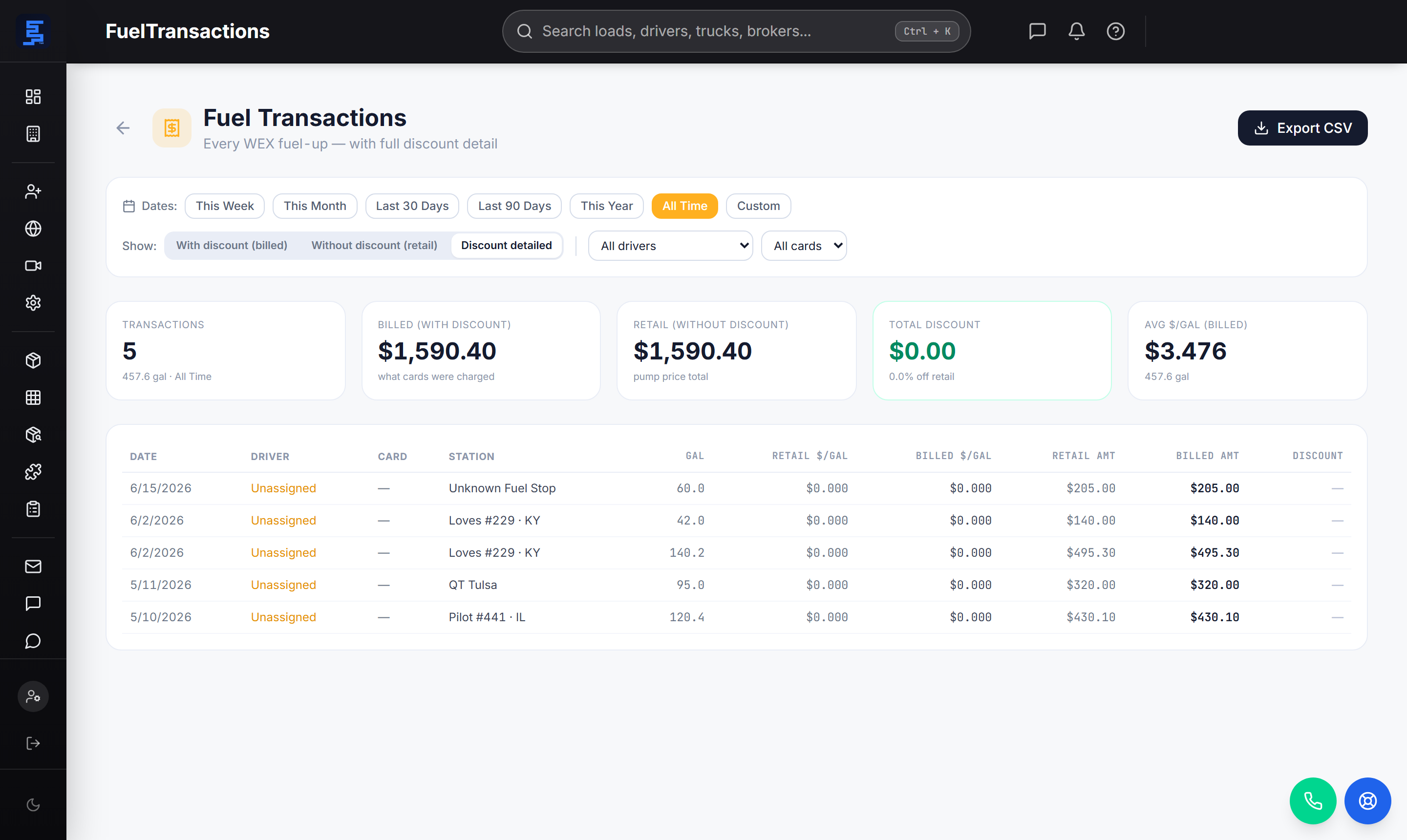
Fuel matched to the truck, verified by GPS
Fuel is an easy deduction to get wrong. Strivie matches every fuel-card transaction to the truck and driver, cross-checked against GPS location, so the gallons land on the right truck, driver, and settlement — and you get true tank-to-tank MPG per fill. When something doesn't line up, it flags it instead of quietly charging the wrong driver.
- Fuel-card transactions matched to truck and driver, GPS-verified — not guesswork
- True tank-to-tank MPG calculated per fill
- Gallons land on the right truck, driver, and settlement automatically
- Fuel charge period is configurable — per-load, or flat calendar week (Mon–Sun / Tue–Mon)
- Review flag when no truck was near the pump or the tank never moved
Advances, POs, and fixed costs, all in one place
Every charge a driver carries flows onto the settlement automatically. Purchase-order charges, load advances, and recurring weekly costs are applied where they belong, and escrow is tracked per driver so the balance is always current.
- PO charges: maintenance, cash advance, towing, lumper, claim loss
- Load advances applied against the settling week
- Weekly fixed costs: truck/trailer rent, insurance, ELD, IFTA, escrow
- Escrow tracked per driver with a running balance
- Owner-operator EIN / LLC company name prints on the pay statement
Direct deposit and QuickBooks, no double entry
When the settlement is right, paying is one step. Strivie exports a Chase ACH file for driver and employee pay from a single company payroll account, and pushes the numbers to QuickBooks — Online and Desktop — so your books match the settlements without re-typing.
- Chase ACH (Nacha-style) CSV for driver and employee direct deposit
- One company payroll account debits the whole run
- Payee name drives the ACH payee and the QuickBooks print-on-check name
- Locked driver pay becomes vendor bills; billed loads become invoices
- Syncs to QuickBooks Online and QuickBooks Desktop
Questions carriers ask
What is trucking payroll software, and how is it different from general payroll tools?
Trucking payroll software calculates driver pay the way carriers actually pay — off loads, miles, and rate, not just hours. General payroll tools have no concept of a load, a rate confirmation, or a per-load rate, so someone ends up building settlements in a spreadsheet first. Strivie starts from the delivered load and drafts the driver settlement itself, then hands off to direct deposit and QuickBooks.
Can I pay drivers by the mile, by percentage, or as an owner-operator in one system?
Yes. Each driver has their own pay setup, and Strivie supports owner-operator, percentage-of-load, and mileage arrangements. Percentage drivers are paid off their share of the load rate, and the settlement itemizes the load pay and every charge against it. You don't switch tools to handle a mixed fleet.
Does it handle owner-operators as well as company drivers?
It's built for both, including owner-operator settlement handling. For owner-ops, the EIN or LLC company name prints on the pay statement, and the payee name drives both the ACH payee and the QuickBooks print-on-check name. Escrow is tracked per driver so owner-op balances stay accurate week to week.
How do fuel advances, escrow, and deductions show up on a driver settlement?
Every charge lands on the settlement automatically. Fuel-card transactions are matched to the truck and driver automatically, cross-checked against GPS so a fill nobody was near gets flagged for review instead of charged, load advances and purchase-order charges (maintenance, towing, lumper, cash advance, claim loss) are applied, and weekly fixed costs like truck rent, insurance, ELD, IFTA, and escrow are itemized. Escrow carries a running per-driver balance.
Does it integrate with my ELD, dispatch, fuel card, and QuickBooks so I don't re-key data?
That's the point. Strivie is an all-in-one TMS, so dispatch, ELD/GPS tracking, and settlements share the same data — the delivered load flows straight into payroll with no re-keying. It's BYOC: you connect your own ELD/GPS, fuel card, factoring, and QuickBooks accounts, and settlements sync to QuickBooks Online and Desktop.
How does the direct deposit and ACH file work?
Strivie generates a Chase ACH (Nacha-style) CSV for both driver and employee pay, debiting a single company payroll account. Locked driver settlements also become vendor bills in QuickBooks, and billed loads become invoices, so your books line up with what you paid. Dispatcher commissions — a configurable percentage of load margin — run through the same payroll.
How is Strivie different from outsourcing to a trucking payroll service?
An outsourced trucking payroll service does the work for you off the data you send them. Strivie does the operational thinking inside your TMS — it drafts driver settlements from delivered loads, matches fuel to the right truck, applies deductions, and generates the ACH file and QuickBooks entries, so your back office stays lean.
Start your morning caught up, not behind
Strivie matches the fuel, applies the deductions, tracks the escrow, and drafts the settlements — then pays out over Chase ACH and books it to QuickBooks. See it run on your own loads.